Simplifying "The Colonel's Bequest"'s Copy Protection
The Colonel’s Bequest is one of my favorite old Sierra games. However, it can be annoying looking up the fingerprint just to get the game started. So, I wanted to patch my legal copy of the game to make the check easier.
The game runs under the SCI interpeter. I’ve done a fair amount of
investigation into their previous engine, called AGI,
so this also makes a fun opportunity to learn a little about what’s changed.
Fortunately, there are ready-made tools for investigations like these; I
don’t need to make my own just to get started.
At the bottom of this post you will find a link to the patch I made.
Tools
I have my own AGI decompiler, but nothing for SCI. So, I downloaded and compiled the SCICompanion. It’s a nice program, and I will definitely reference it if I ever make my own SCI resource dumper.
Anyway, to start with, I decompiled all the scripts, which come out in s-expressions. Nice!
Getting My Bearings
I know from AGI games that logic script 0 is very important (it always runs no matter what room you are in, so it has globally important stuff like the game menu and what-not). I’m not sure if SCI is similar or not, but the script 0 is one of the largest. I’ll start there.
Right away, I make the following observations:
- the code is full of
#selectorand message sends, so it feels very Smalltalk-inspired. AGI referenced objects, but this is a whole new level of object-orientation. proc0_19looks like it handles the Restore/Restart/Quit dialog, which means it may be very easy to find all the possible deaths in the game (they will all call this proc one way or another). Maybe there are some I haven’t seen!- Given that high-level stuff such as the game-over dialog is in script 0, I may be on the right track to adjust how the game starts.
Ok, when looking for things in AGI games, the most efficient method is to
search for strings that appear on the screens I care about. The text resources
and the logic resources generally line up one-to-one. Trying that for
The Colonel's Bequest works right away. I make the following two easy finds:
- Logic 414 has the copy protection text
- Logic 409 has the “have you seen the intro yet” question
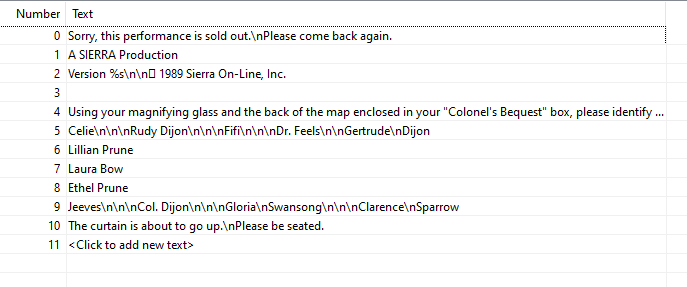
So, I know I need to find a way to get to script 409, and script 414 has the code that stops me. Alright, then how do we get to 414 in the first place?
Method One
I’m looking for where the game goes into the copy-protection screen. In no
time, I find an object representing the Game itself, and they presumptuously
called it CB1 (although there was a sequel to many Sierra games, so I guess
it wasn’t too much of a stretch). In CB1’s #init method, it sets things
up and then jumps to room 99:
(instance CB1 of Game
  (properties)

  (method (init)
    < ... elided setup stuff ... >

    (if (GameIsRestarting)
      (= global16 1)
      (SetCursor 997 0 320 200)
      (TheMenuBar draw: state: 1 hide:)
    )
    (self newRoom: 99)
  )
    ...
)
In script 99, it’s not hard at all to see our first possibility for a patch. Here’s the code I’m talking about:
(if
  (and
    (not global16)
    (not (StrCmp {zz} (+ global28 7)))
  )
  (self setScript: (ScriptID 409 0))
else
  (global2 newRoom:
  (switch global16
    (1 44)
    (else  414)
  ))
)
Remember that 409 is the “do you want to see the intro?” script. It’s clear
here that if global16 is not set, and if global28 + 7 == zz, then we
will jump right to 409. Otherwise it goes to either the copy protection room,
or room 44 (the starting room with Lillian and Laura, so I guess that’s what
happens on a restart).
That zz check seems like debug code to me, to help developers
skip the copy protection. Ok, so in Script 0, let’s see how those
two globals are set. I see only one of them set in the init section:
(= global28 {1.000.046})
Hmmm.. that’s the SCI version string. So, I’m guessing the +7 part
actually skips the first 7 characters, and we just need to change the
string to 1.000.0zz.
I create a patch with the changed version string, and success! The game goes right to the intro question.
Method Two
While I got what I wanted, I quickly realized a different approach would please me more. The problem with Method One is: you don’t get to see the copy protection screen. That means you don’t hear the music, or see the graphics. It’s just not the same. What I’d really like is: I get the fingerprint question, and then the game lets me guess until I hit the right name.
So, I need to see how script 414 works. In retrospect, I probably should have started with that anyway.
The Path to Victory
I started with the question: where does 414 go to 409? Only one place in the file:
(instance identify of Script
 (method (changeState newState &tmp [temp0 25])
  (switch (= state newState)
        < ... ELIDED ... >
    (6
      (= local104 1)
      (= local102 1)
      (localproc_01a9)
      (proc255_0 414 10 30 1)
      (SetCursor 997 1 300 0)
      (self setScript: (ScriptID 409 0))
    )
  )
 )
)
Unfortunately, I didn’t see any explicit calls to changeState in the script.
It must be some kind of implicit magic.
The Path to Defeat
Since the path to script 409 wasn’t obvious, I tried instead to find out where the game checks your fingerprint selection. First of all, where does the game store the correct fingerprint?
It didn’t take long to find the fingerprint, since I knew the game would
have to select it randomly, and there’s only one set of random calls in
this script (int myCopy #init):
(= local0 (/ (Random 0 600) 100))
(= local1 (/ (Random 1 1000) 250))
I don’t know what those numbers mean, but now I can look for references to them. For example, here is what appears to be a mouse button event handler:
(evMOUSEBUTTON
  (= local104 1)
  (= local102 1)
  (if
    (==
      (= local4 (localproc_0150 (pEvent x?) (pEvent y?)))
      [local53 (+ (* local1 6) local0)]
    )
    (self cue:)
  else
    (localproc_01bf)
  )
  (pEvent claimed: 1)
)
I haven’t tried to decipher what the math there is all about (but it
looks to be an array index into local53). It’s plain that there are
two paths here, though… (self cue:) and (localproc_01bf). I bet
one of those is the right answer and one of them is the wrong answer.
If I change the wrong answer into a NO-OP of some kind, I bet I can just click fingerprints until I hit the right one!
Since I don’t see a #cue method, I’m guessing it’s in the base class,
and maybe that’s why I can’t see how to get to the happy #changeState
method. So, let’s attack localproc_01bf and hope for the best.
Recall, I want to make it a no-op. Here’s the dissassemly for the procedure:
(procedure proc_01bf
  01bf:76           push0
  01c0:40 ffe5 00   call proc_01a9 0

  01c4:39 04        pushi 4 // $4 x
  01c6:38 019e      pushi 19e // $19e sel_414
  01c9:76           push0
  01ca:39 1e        pushi 1e // $1e mode
  01cc:78           push1
  01cd:47 ff 00 08  calle ff procedure_0000 8 //

  01d1:35 01        ldi 1
  01d3:a1 04        sag
  01d5:48           ret
)
… looks like 0x48 is the opcode for ret… so let’s just make that
the first instruction (instead of the 0x76)!
Using a hex-editor, I adjust the code.

No luck! It doesn’t throw me out when I make a guess, but the cursor switches from a magnifying glass to a normal cursor, and I’m stuck there. Clicking on all the names did not work.
Looking closer, I see that the event code isn’t executed if local104 is set,
and the handlers all set it. I need to undo that. Let’s NOP over the check
and see what happens. Here’s the dissassembly for the start of the
#handleEvent method):
(method (handleEvent) // method_02d0
  02d0:3f 01        link 1 // (var $1)
  02d2:83 68        lal local104
  02d4:18           not
  02d5:30 0286      bnt code_055e
  02d8:83 66        lal local102
  02da:30 008d      bnt code_036a
  02dd:39 22        pushi 22 // $22 type
  02df:76           push0
  02e0:87 01        lap param1
So, I’ll change the code for bnt code_055e to not not not, since
I don’t know an SCI opcode for an actual no-op. So, 30 86 02 to
18 18 18 …

… and it kinda works. You have to press Enter after each guess, but
then you can try again with the mouse or keyboard. Progress!
So, what does pressing
Enter do, anyway? Here’s the code… basically this is for the case
where you don’t want to see the magnifying glass animation and want to
jump directly to the copy protection question. It disposes the logo, shows
the fingerprint, puts the glass on the upper left choice, and makes a
mysterious call to identify #state and self #cue.
((== (pEvent message?) KEY_RETURN)
  (Logo dispose:)
  (Glass posn: 162 140 setMotion: 0 stopUpd:)
  (Finger show: stopUpd:)
  (identify state: 4 seconds: 0 cycles: 0)
  (self cue:)
)
I’m starting to think that self #cue pushes the state up by one.
Anyhow, let’s see what happens if we splice those two calls into the
failure routine, rather than just returning.
The dissassembly for those calls is as follows:
  0327:39 20       pushi 20 // $20 state
  0329:78          push1
  032a:39 04       pushi 4 // $4 x
  032c:39 73       pushi 73 // $73 seconds
  032e:78          push1
  032f:76          push0
  0330:39 72       pushi 72 // $72 cycles
  0332:78          push1
  0333:76          push0
  0334:72 04c7     lofsa $07fe // identify
  0337:4a 12       send 12

  0339:39 79       pushi 79 // $79 cue
  033b:76          push0
  033c:54 04       self 4
So, I put that code into the failure function (modified slightly to fit in the space I have)…

… and the program crashes now. I was concerned about sending messages from outside the object, and it turns out that’s a no-no (at least, I’d have to be more sophisticated about SCI bytecodes than I am at present to get it right).
Method Three
Well, I wanted to be able to guess unlimited times until I got it right, but the next best change I can think of is to make the game think I am always right. Let’s revisit the mouse-click code:
(evMOUSEBUTTON
  (= local104 1)
  (= local102 1)
  (if
    (==
      (= local4 (localproc_0150 (pEvent x?) (pEvent y?)))
      [local53 (+ (* local1 6) local0)]
    )
    (self cue:)
  else
    (localproc_01bf)
  )
  (pEvent claimed: 1)
)
Can we just call self #cue either way? Here’s the disassembly where the
two calls are. Luckily, they are both 5 bytes:
  03a9:39 79       pushi 79 // $79 cue
  03ab:76          push0
  03ac:54 04       self 4

  03ae:32 0005     jmp code_03b6

        code_03b1
  03b1:76          push0
  03b2:40 fe09 00  call proc_01bf 0
So, let’s change them so that #cue is called on both branches…
That’s three identical changes for keyboard, joystick, and mouse actions:
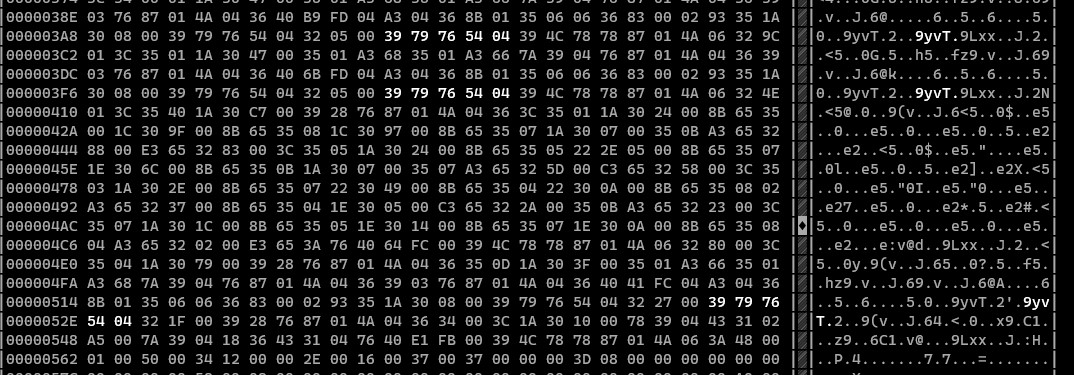
… and it works perfectly! Now, no matter which answer I pick, the game thinks I’m correct. And, as a bonus, I only have to alter the script specific to copy-protection, making me somewhat sure I did not screw up the rest of the game.
Here’s the patch file (just place it in the game directory as script.414
and restart the game): script.414.